
· mQuark · Technical Guides · 4 min read
Beyond Fire-and-Forget: The Strongly-Typed Http Rule
Deep dive into two-way communication in Actionful workflows
In many workflow engines, an HTTP step is little more than a webhook — a mechanism to fire data at a third-party service and move on. But in complex orchestrations, you rarely just need to send data; you need to exchange it. You need to fetch a user profile, confirm a payment status, or retrieve a weather report to determine the next branch in your logic.
At mQuark, we designed the Http Rule to be a first-class citizen of the type system. It isn’t a side effect — it is a full functional component that sends requests, processes responses in a safe scope, and returns strongly-typed data back into your workflow.
The Architecture: Request, Scope, and Result
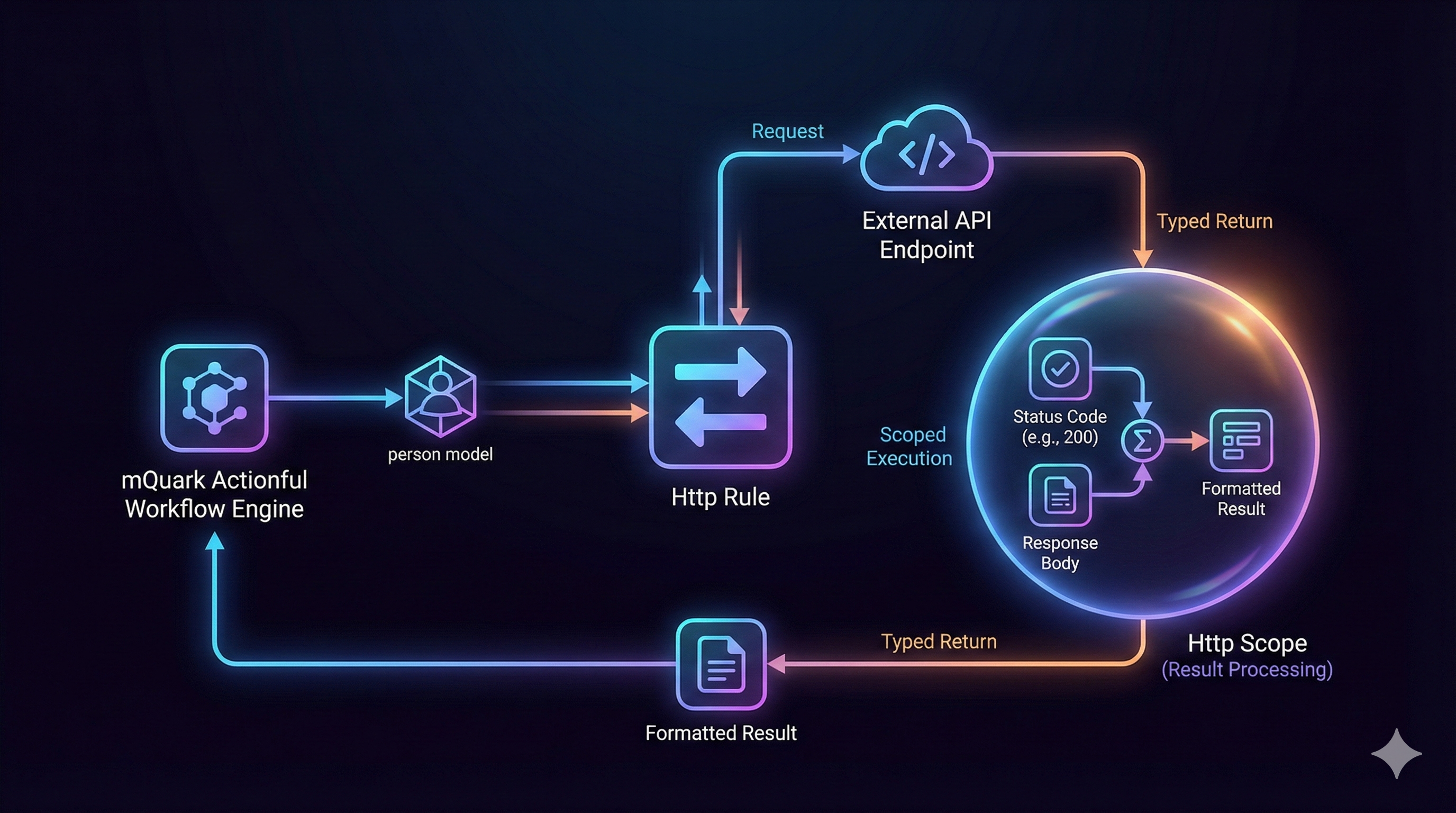
The defining feature of the Actionful Http rule is scoped execution.
When you define an Http rule, you specify not just a URL and method but also a Result block — the logic to run once the response arrives. Here is the sequence:
- Request: The engine constructs the HTTP request (with your headers and typed body) and sends it.
- Scope activation: Upon receiving a response, the engine opens a temporary Http scope.
- Result execution: The logic in your
Resultproperty runs inside this scope, with access to the response data. - Return: The value produced by the
Resultlogic becomes the return value of the entireHttprule.
This means the Http rule’s return type is determined entirely by whatever your Result block returns. If your result processes a JSON body and produces a number, the Http rule returns a number.
A Real-World Example
In this workflow, we POST a person object to an external API. We want to capture both the HTTP status code and the raw response body, combining them into a summary string for the caller.
<Http BodyType="person" Method="Post" SkipStatusCodeCheck="True">
  <Http.Url>
    <StringConstant Value="https://webhook.site/a0ffd635..." />
  </Http.Url>

  <Http.Headers>
    <KeyedRule Key="some-header">
      <StringConstant Value="header-value" />
    </KeyedRule>
  </Http.Headers>

  <Http.Body>
    <ObjectBuilder ShapeId="person">
      <KeyedRule Key="Name">
        <GetInput />
      </KeyedRule>
      <KeyedRule Key="Age">
        <NumericConstant Value="45" />
      </KeyedRule>
    </ObjectBuilder>
  </Http.Body>

  <Http.Result>
    <StringFormat Template="HTTP Status: $(status), Result: $(result)">
      <KeyedRule Key="status">
        <NumberToString>
          <GetHttpStatusCode />
        </NumberToString>
      </KeyedRule>
      <KeyedRule Key="result">
        <GetHttpResponse />
      </KeyedRule>
    </StringFormat>
  </Http.Result>
</Http>
Breaking Down the Mechanics
1. Strongly-Typed Body Construction
BodyType="person" tells the engine that the Body property must match the person model definition. The ObjectBuilder constructs the object on the fly: Name is pulled dynamically from the workflow input via GetInput, while Age is hardcoded. If the body does not conform to the declared type, the workflow fails validation before it ever executes.
2. Configurable Error Handling
SkipStatusCodeCheck="True" disables the default behavior of throwing a workflow exception on 4xx or 5xx responses. With it set, the rule always proceeds to the Result block regardless of the HTTP status code. This lets you handle errors explicitly — capturing the status code and body rather than propagating an exception.
3. Scoped Result Processing
The <Http.Result> block runs inside the Http scope, which activates two special rules:
GetHttpStatusCode— retrieves the integer status code (e.g.,200,404).GetHttpResponse— retrieves the raw response body as a string.
These rules are only meaningful inside an Http rule’s result scope; using them outside one produces a validation error.
The StringFormat combines both values into a single string — "HTTP Status: 200, Result: { ...json... }" — which becomes the return value of the entire Http rule.
Sending Without Reading: Fire-and-Forget
When you don’t need to process the response at all, use Noop as the result:
<Http Method="Post" SkipStatusCodeCheck="True">
  <Http.Url>
    <StringConstant Value="https://hooks.slack.com/services/..." />
  </Http.Url>
  <Http.Body>
    <!-- ... your payload ... -->
  </Http.Body>
  <Http.Result>
    <Noop />
  </Http.Result>
</Http>
This executes the POST and returns void — a clean fire-and-forget with no response handling overhead.
Summary
The Http rule in Actionful is designed for transactional integrity. By executing your result logic inside the context of the HTTP response, you process and validate external data exactly where it is received — at the edge of your integration.
Whether you are building simple webhooks or complex state synchronizations, the SkipStatusCodeCheck flag and the Result scope together give you full, type-safe control over how your workflow interacts with the outside world.